Navigating Blog Content
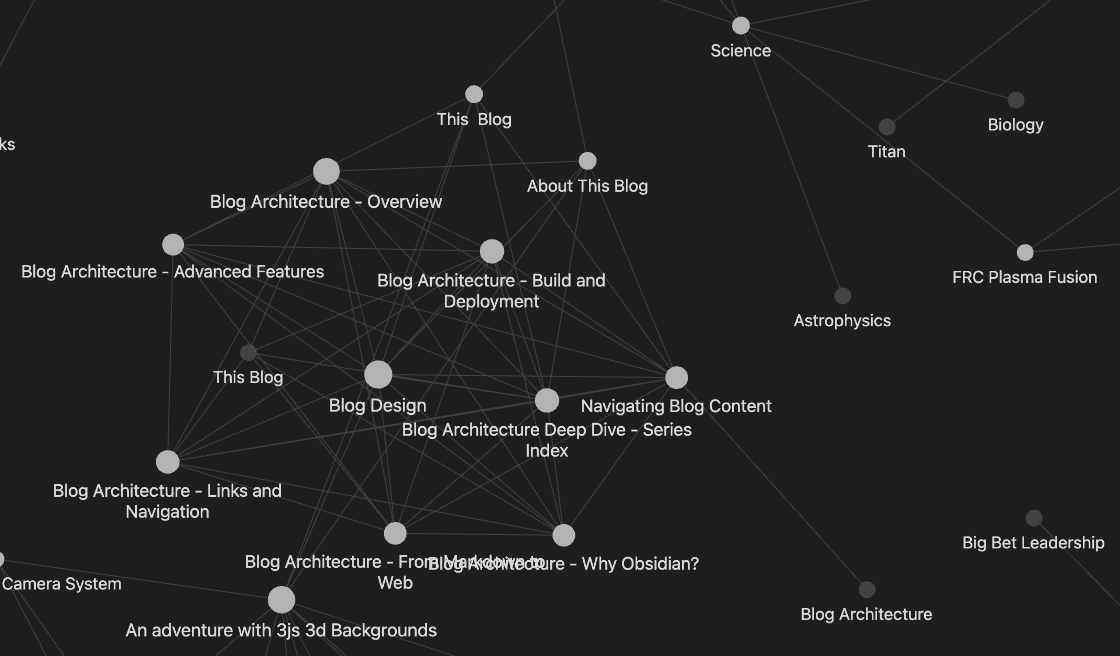
This blog is designed with multiple ways to explore and discover content, inspired by tools like Obsidian that emphasize connections and relationships between ideas.
For more about the blog's architecture and technical implementation, see Blog Architecture Deep Dive - Series Index. For an overview of all blog design articles, see Blog Design.
Navigation Methods
1. Categories and Tags
Every post is tagged with relevant categories. You can:
-
Browse by category: Click any category tag on a post to see all posts in that category
-
Category navigation: Use the category links at the top of the home page
-
Multiple tags: Posts can belong to multiple categories, making them discoverable from different angles
Demo: Category Navigation
When you click on a category tag like "Planetary Science", you'll see:
- Filtered Post List: All posts tagged with that category, organized by series
- Series as Units: Series are shown as complete units (carousels), not individual parts
Example Flow:
Home → Click "Planetary Science" → All Planetary Science Posts
Future Enhancement:
- Category introduction pages (to be created) would provide:
- Introduction to the subject area
- Overview of key topics covered
- Table of contents for posts in this category
- Links to related categories
2. Series and Threads
Related posts can be grouped into series or threads:
-
Series: A sequence of posts on a related topic (like chapters in a book)
-
Series navigation: When viewing a post in a series, you'll see navigation to move between parts
-
Series carousel: On the home page, series are shown as a single card with left/right arrows to browse through all parts
-
Nested series: Series can contain sub-series, creating hierarchical structures
Demo: Series Navigation
Simple Series Example:
The 3D Background (Part 1 of 6)
├─ Part 1: Introduction
├─ Part 2: Terrain Generation
├─ Part 3: Atmospheric Effects
│   ├─ Fog Visualization
│   ├─ Rain Visualization
│   └─ Snow Visualization
├─ Part 4: Camera System
├─ Part 5: Cell Shading
└─ Part 6: Performance Optimization
Series Carousel on Homepage:
- Single card representing the entire series
- Left/Right arrows to navigate between parts
- Shows current part number (e.g., "Part 2 of 6")
- Click to view the current part
Series Navigation on Post Page:
- Sidebar shows all posts in the series
- Highlights current post
- Previous/Next buttons for sequential navigation
- Click any post in the series to jump directly
3. Search
The header search provides semantic search across all content:
-
Vector-based: Uses embeddings for semantic understanding
-
Real-time: Results update as you type
-
Contextual: Finds posts by title, excerpt, and categories
Demo: Search Functionality
Search Examples:
- Type "fusion" → Finds posts about nuclear fusion, plasma physics, energy
- Type "3D rendering" → Finds posts about 3D graphics, WebGL, Three.js
- Type "Mars exploration" → Finds posts about Mars, planetary science, space missions
Search Results Include:
- Post title
- Excerpt/preview
- Matching categories
- Relevance score
5. Linked Posts
At the bottom of posts that contain links to other posts, you'll find Related Content:
-
Posts that are linked from the current article (using
<a href="https://x.com/messages/compose?recipient_id=519293130&text=Hi!%20I%20noticed%20the%20page%20%22wiki%20links%22%20isn't%20complete%20yet.%20Would%20love%20to%20see%20it%20finished!%20%F0%9F%92%99" target="_blank" rel="noopener noreferrer" class="obsidian-link incomplete" data-link="wiki links" title="This page isn't complete yet. Click to DM @dbgray to request completion">wiki links</a>) -
Discover related topics and follow connections
-
Expand your exploration organically
Note: This section only appears when the current post contains links to other published posts.
6. Graph View
On the home page, the secondary navigation sidebar includes a Graph View that visualizes:
- All posts and their relationships
- Link connections between posts
- Interactive exploration of the content network
- Click nodes to navigate to posts
Demo: Link-Based Discovery
Example Link Chain:
<a href="/blog/Science%2FPlanetary_Science_Space" class="obsidian-link active" title="Solar System Exploration">Planetary Science & Space</a>
  → Links to: <a href="/blog/Science%2FPlanetary_Science_Space%2FMars" class="obsidian-link active" title="Mars: The Red Planet and the Search for Life">Mars</a>
    → Links to: <a href="https://x.com/messages/compose?recipient_id=519293130&text=Hi!%20I%20noticed%20the%20page%20%22Mars%20Sample%20Return%22%20isn't%20complete%20yet.%20Would%20love%20to%20see%20it%20finished!%20%F0%9F%92%99" target="_blank" rel="noopener noreferrer" class="obsidian-link incomplete" data-link="Mars Sample Return" title="This page isn't complete yet. Click to DM @dbgray to request completion">Mars Sample Return</a> (to be created)
      → Links to: <a href="https://x.com/messages/compose?recipient_id=519293130&text=Hi!%20I%20noticed%20the%20page%20%22Sample%20Analysis%20Techniques%22%20isn't%20complete%20yet.%20Would%20love%20to%20see%20it%20finished!%20%F0%9F%92%99" target="_blank" rel="noopener noreferrer" class="obsidian-link incomplete" data-link="Sample Analysis Techniques" title="This page isn't complete yet. Click to DM @dbgray to request completion">Sample Analysis Techniques</a> (to be created)
  → Links to: <a href="/blog/Science%2FPlanetary_Science_Space%2FEuropa" class="obsidian-link active" title="Europa: An Ocean World in the Outer Solar System">Europa</a>
    → Links to: <a href="https://x.com/messages/compose?recipient_id=519293130&text=Hi!%20I%20noticed%20the%20page%20%22Subsurface%20Ocean%22%20isn't%20complete%20yet.%20Would%20love%20to%20see%20it%20finished!%20%F0%9F%92%99" target="_blank" rel="noopener noreferrer" class="obsidian-link incomplete" data-link="Subsurface Ocean" title="This page isn't complete yet. Click to DM @dbgray to request completion">Subsurface Ocean</a> (to be created)
      → Links to: <a href="https://x.com/messages/compose?recipient_id=519293130&text=Hi!%20I%20noticed%20the%20page%20%22Astrobiology%22%20isn't%20complete%20yet.%20Would%20love%20to%20see%20it%20finished!%20%F0%9F%92%99" target="_blank" rel="noopener noreferrer" class="obsidian-link incomplete" data-link="Astrobiology" title="This page isn't complete yet. Click to DM @dbgray to request completion">Astrobiology</a> (to be created)
Link Types:
- Forward links: Posts you link to (shown at bottom of current post)
- Backlinks: Posts that link to you (shown in their "Related Content")
- Bidirectional exploration: Navigate both directions
Design Philosophy
This navigation system is inspired by:
-
Obsidian: Wiki-style linking and graph views
-
Knowledge graphs: Emphasizing connections between ideas
-
Progressive disclosure: Showing structure without overwhelming
-
Multiple entry points: Different ways to discover the same content
Content Organization Approaches
This blog supports multiple approaches to organizing content. Each has its strengths and use cases.
Approach 1: Category-Based Organization
How it works:
- Posts are tagged with categories in frontmatter
- Category pages provide introductions and overviews
- Navigation menu shows top categories
- Filtering by category shows all related posts
Example Structure:
Categories:
  - Planetary Science
  - Nuclear Physics
  - Coding Projects
  - Business & Economics
Pros:
- ✅ Flexible: Posts can belong to multiple categories
- ✅ Easy to discover related content across different topics
- ✅ Category pages provide context and introductions
- ✅ Works well for cross-cutting topics
- ✅ Non-hierarchical: Doesn't force a single structure
Cons:
- ❌ Can become overwhelming with many categories
- ❌ Categories may overlap or become redundant
- ❌ Less structured than hierarchical approaches
- ❌ Requires manual tagging and maintenance
Best For:
- Blogs with diverse, cross-cutting topics
- Content that doesn't fit a single hierarchy
- Discovery-focused navigation
- Tag-based exploration
Approach 2: Directory Structure Mapping
How it works:
- File system directory structure maps directly to navigation
- Menu structure mirrors folder organization
- URLs reflect directory paths
- Natural hierarchy from file organization
Example Structure:
Blog/
├── Science/
│   ├── Planetary Science & Space/
│   │   ├── Mars.md
│   │   ├── Europa.md
│   │   └── Titan.md
│   ├── Nuclear/
│   │   ├── Fission & Fusion.md
│   │   └── LFTR.md
│   └── Condensed Matter Physics/
├── Coding/
│   ├── Blog Architecture/
│   └── The 3D Background/
└── Business/
Pros:
- ✅ Intuitive: Matches file system organization
- ✅ Automatic: Structure emerges from file organization
- ✅ Clear hierarchy: Easy to understand relationships
- ✅ Scalable: Works for large content collections
- ✅ Maintainable: Move files to reorganize
Cons:
- ❌ Rigid: One post can only be in one location
- ❌ File system constraints: Limited flexibility
- ❌ Cross-references: Harder to show multiple relationships
- ❌ Migration: Moving files changes URLs
Best For:
- Well-organized, hierarchical content
- Technical documentation
- Tutorial series
- Content with clear parent-child relationships
Approach 3: Content Hierarchy (Link-Based)
How it works:
- Content tree built from Obsidian links (
[ [ Post Name ] ]) - Parent-child relationships from link patterns
- Series relationships preserved within hierarchy
Example Structure:
Blog Architecture Deep Dive (root)
├── Overview (linked from Blog Architecture Deep Dive)
│   └── Why Obsidian? (linked from Overview)
├── From Markdown to Web (linked from Blog Architecture Deep Dive)
└── Links and Navigation (linked from Blog Architecture Deep Dive)
    └── Advanced Features (linked from Links and Navigation)
Pros:
- ✅ Flexible: Multiple parents possible (graph structure)
- ✅ Semantic: Structure reflects actual relationships
- ✅ Dynamic: Changes as you add links
- ✅ Natural: Follows how you think about connections
- ✅ Non-destructive: Doesn't require file moves
Cons:
- ❌ Complex: Can create cycles (prevented by system)
- ❌ Implicit: Structure not immediately visible
- ❌ Requires links: Must actively link posts
- ❌ Can be messy: Many links create complex graphs
Best For:
- Knowledge bases
- Interconnected ideas
- Research notes
- Content with many cross-references
Approach 4: Hybrid (Recommended)
How it works:
- Combines directory structure, categories, and link-based hierarchy
- Directory structure provides primary organization
- Categories enable cross-cutting discovery
- Links create semantic relationships
- Series group related sequential content
Example:
Directory Structure (primary navigation)
  Science/Planetary Science & Space/Planets And Moons/
    ├── Mars.md (category: Planetary Science, links to: Europa)
    ├── Europa.md (category: Planetary Science, links to: Titan)
    └── Titan.md (category: Planetary Science)

Categories (filtering)
  Planetary Science → Shows all posts with this category

Links (relationships)
  <a href="/blog/Science%2FPlanetary_Science_Space%2FMars" class="obsidian-link active" title="Mars: The Red Planet and the Search for Life">Mars</a> → Links to → <a href="/blog/Science%2FPlanetary_Science_Space%2FEuropa" class="obsidian-link active" title="Europa: An Ocean World in the Outer Solar System">Europa</a> (shown in Related Content)

Series (grouping)
  The 3D Background (series)
    ├── Part 1: Introduction
    ├── Part 2: Terrain Generation
    └── Part 3: Atmospheric Effects
Pros:
- ✅ Best of all worlds: Structure, flexibility, and discovery
- ✅ Multiple entry points: Directory, category, link, series
- ✅ Scalable: Works for any content size
- ✅ Maintainable: Clear organization with flexibility
- ✅ User-friendly: Different navigation methods for different needs
Cons:
- ❌ More complex: Requires understanding multiple systems
- ❌ More maintenance: Need to manage categories, links, and structure
- ❌ Potential redundancy: Same content accessible multiple ways
Best For:
- Most blog types
- Content with both hierarchical and cross-cutting relationships
- Long-term content growth
- Diverse audience needs
Category Pages: Deep Dive
Category pages are special pages that provide introductions and organization for a category. Currently, category filtering works by showing all posts with a given category tag. Category introduction pages are a proposed enhancement.
Current Implementation
How it works:
- Posts are tagged with categories in frontmatter
- Clicking a category tag filters to show all posts in that category
- Category pages (introduction pages) are a proposed feature
Current Category Filtering:
- Click any category tag on a post
- See all posts tagged with that category
- Posts are organized by series when applicable
Category Introduction Pages (Proposed)
Proposed Implementation:
- Files named
{category-name}-category.mdwould be detected - Shown at top of category-filtered views
- Can include introductions, overviews, and TOCs
- Supports full markdown content
Example Structure:
Planetary Science-category.md
---
title: Planetary Science
published: published
categories:
  - Meta
---

# Planetary Science

Planetary science is the study of planets, moons, and planetary systems...

## Topics Covered

- Mars exploration and geology
- Icy moons and subsurface oceans
- Atmospheric studies
- Space missions and technology

## Featured Articles

<a href="/blog/Science%2FPlanetary_Science_Space%2FMars" class="obsidian-link active" title="Mars: The Red Planet and the Search for Life">Mars</a>
<a href="/blog/Science%2FPlanetary_Science_Space%2FEuropa" class="obsidian-link active" title="Europa: An Ocean World in the Outer Solar System">Europa</a>
<a href="/blog/Science%2FPlanetary_Science_Space%2FTitan" class="obsidian-link active" title="Titan: Saturn's Moon with Lakes and Seas">Titan</a>
Enhanced Category Pages (Future Enhancement)
Features:
- Automatic TOC Generation: Table of contents for all posts in category
- Featured Posts: Highlight important or introductory posts
- Subcategory Organization: Organize posts by subcategories
- Related Categories: Show links to related categories
- Series Overview: Show all series in this category
Example Enhanced Structure:
---
title: Planetary Science
category: Planetary Science
published: published
---

# Planetary Science

Introduction to planetary science...

## Table of Contents

<!-- Auto-generated TOC for all posts in this category -->

## Featured Articles

- <a href="/blog/Science%2FPlanetary_Science_Space%2FMars" class="obsidian-link active" title="Mars: The Red Planet and the Search for Life">Mars</a>: The Red Planet
- <a href="/blog/Science%2FPlanetary_Science_Space%2FEuropa" class="obsidian-link active" title="Europa: An Ocean World in the Outer Solar System">Europa</a>: Icy Moon with Subsurface Ocean
- <a href="/blog/Science%2FPlanetary_Science_Space%2FTitan" class="obsidian-link active" title="Titan: Saturn's Moon with Lakes and Seas">Titan</a>: Earth-like Moon of Saturn

## Series in This Category

- **Planetary Exploration Series**: Multi-part exploration of... (to be created)
  - Part 1: Overview
  - Part 2: Mars Missions
  - Part 3: Outer Planet Exploration

## Subcategories

- **Inner Planets**: <a href="/blog/Science%2FPlanetary_Science_Space%2FMercury" class="obsidian-link active" title="Mercury: The Extreme World at the Edge of the Sun">Mercury</a> (to be created), <a href="/blog/Science%2FPlanetary_Science_Space%2FVenus" class="obsidian-link active" title="Venus: The Hellish World Behind the Veil">Venus</a> (to be created), <a href="/blog/Science%2FPlanetary_Science_Space%2FMars" class="obsidian-link active" title="Mars: The Red Planet and the Search for Life">Mars</a>
- **Outer Planets**: <a href="/blog/Science%2FPlanetary_Science_Space%2FJupiter" class="obsidian-link active" title="Jupiter: The King of Planets and Guardian of the Inner Solar System">Jupiter</a> (to be created), <a href="/blog/Science%2FPlanetary_Science_Space%2FSaturn" class="obsidian-link active" title="Saturn: The Ringed Jewel of the Solar System">Saturn</a> (to be created), <a href="/blog/Science%2FPlanetary_Science_Space%2FUranus" class="obsidian-link active" title="Uranus: The Tilted Ice Giant">Uranus</a> (to be created), <a href="/blog/Science%2FPlanetary_Science_Space%2FNeptune" class="obsidian-link active" title="Neptune: The Windy Blue Giant at the Edge">Neptune</a> (to be created)
- **Moons**: <a href="/blog/Science%2FPlanetary_Science_Space%2FEuropa" class="obsidian-link active" title="Europa: An Ocean World in the Outer Solar System">Europa</a>, <a href="/blog/Science%2FPlanetary_Science_Space%2FGanymede" class="obsidian-link active" title="Ganymede: The Solar System's Largest Moon">Ganymede</a> (to be created), <a href="/blog/Science%2FPlanetary_Science_Space%2FTitan" class="obsidian-link active" title="Titan: Saturn's Moon with Lakes and Seas">Titan</a>

## Related Categories

- <a href="https://x.com/messages/compose?recipient_id=519293130&text=Hi!%20I%20noticed%20the%20page%20%22Space%20Technology%22%20isn't%20complete%20yet.%20Would%20love%20to%20see%20it%20finished!%20%F0%9F%92%99" target="_blank" rel="noopener noreferrer" class="obsidian-link incomplete" data-link="Space Technology" title="This page isn't complete yet. Click to DM @dbgray to request completion">Space Technology</a> (to be created)
- <a href="https://x.com/messages/compose?recipient_id=519293130&text=Hi!%20I%20noticed%20the%20page%20%22Astrobiology%22%20isn't%20complete%20yet.%20Would%20love%20to%20see%20it%20finished!%20%F0%9F%92%99" target="_blank" rel="noopener noreferrer" class="obsidian-link incomplete" data-link="Astrobiology" title="This page isn't complete yet. Click to DM @dbgray to request completion">Astrobiology</a> (to be created)
- <a href="/blog/Science%2FEngineering%2FRemote_Sensing" class="obsidian-link active" title="Remote Sensing Projects">Remote Sensing</a> (to be created)
Directory-to-Menu Mapping
Mapping directory structure to navigation menu provides a natural, file-system-based organization.
Implementation Approach
Basic Mapping:
Directory Structure          →  Navigation Menu
─────────────────────────────────────────────────
Science/                    →  Science
  Planetary Science/         →    Planetary Science
    Mars.md                  →      Mars
    Europa.md                →      Europa
  Nuclear/                   →    Nuclear
    Fusion.md                →      Fusion
Advanced Features (Proposed):
- Menu Ordering: Use frontmatter to control menu order
- Menu Labels: Custom labels different from file names
- Hidden Items: Hide certain directories from menu
- Grouping: Group related directories
Example Frontmatter (Proposed):
---
title: Planetary Science & Space
menu:
  order: 2
  label: "Planetary Science"
  group: "Science"
  hidden: false
---
Current Implementation:
- Navigation menu shows top-level pages (files in root directory)
- Uses header config navigation list when available
- Directory structure is reflected in URLs but not directly in main navigation menu
Pros and Cons
Pros:
- ✅ Intuitive: Matches file organization
- ✅ Automatic: No manual menu configuration
- ✅ Scalable: Works for large hierarchies
- ✅ Maintainable: Reorganize by moving files
- ✅ Clear structure: Easy to understand
Cons:
- ❌ Rigid: One location per post
- ❌ URL changes: Moving files changes URLs
- ❌ Cross-cutting: Hard to show multiple relationships
- ❌ File system constraints: Limited flexibility
Recommendations
For New Blogs
Start with Hybrid Approach:
- Organize files in directories by topic
- Use categories for cross-cutting themes
- Link related posts with
[ [ Post Name ] ] - Group sequential content into series
- Create category introduction pages for major topics (when implemented)
For Existing Blogs
Migration Strategy:
- Assess current structure: Review how content is organized
- Identify patterns: Find natural groupings and relationships
- Plan directory structure: Design folder hierarchy
- Add categories: Tag posts with relevant categories
- Add links: Create semantic connections between posts
- Create category pages: Write introductions for major categories (when implemented)
- Test navigation: Ensure all navigation methods work
Best Practices
- Consistent naming: Use consistent file and category naming
- Clear hierarchy: Keep directory structure logical
- Meaningful links: Link posts that are actually related
- Category pages: Create introductions for major categories (when implemented)
- Series for sequences: Use series for multi-part content
- Regular review: Periodically review and reorganize
Tips for Exploration
-
Start with categories: If you know your interest area, browse by category
-
Follow series: Series provide structured, sequential learning
-
Use search: Find specific content with semantic search
-
Click links: Follow connections between related posts
-
Explore series: Use the carousel to browse through series parts
-
Check category pages: Read introductions to understand topic areas (when available)
-
Follow directory structure: Use folder organization as navigation guide
Series Structure
Series can be simple (linear sequence) or complex (nested hierarchies):
-
Simple series: Part 1 → Part 2 → Part 3
-
Nested series: A series can contain sub-series, like chapters containing sections
-
Series within series: For example, "The 3D Background" contains "Atmospheric Effects" which has its own sub-posts
This structure allows for both broad overviews and deep dives into specific topics.
Content Tree Structure
The blog automatically builds a content tree from Obsidian links. When you link to another post using [ [ Post Name ] ], the system:
-
Establishes relationships: Creates parent-child relationships between linked posts
-
Builds hierarchy: Organizes content into a tree structure based on link patterns
-
Preserves series: Maintains series relationships while incorporating link-based structure
-
Prevents cycles: Ensures the tree structure remains acyclic
This creates a natural navigation flow that follows the connections you've made in your notes.
Link-Based Navigation
Obsidian links ([ [ Post Name ] ]) create implicit navigation paths:
-
Forward links: Posts you link to become children in the tree
-
Backlinks: Posts that link to you appear as potential parents
-
Bidirectional exploration: Navigate both up (to parents) and down (to children)
The tree structure makes it easy to:
-
Follow a thread: Start at a root post and explore its children
-
Understand context: See what posts lead to the current one
-
Discover connections: Find related content through link relationships
Future Enhancements
Planned improvements include:
-
Reading progress tracking
-
Personalized recommendations
-
Advanced filtering and sorting
-
Export and sharing features
-
Enhanced category pages with auto-generated TOCs
-
Directory-based menu generation
-
Multi-level category hierarchies
Note: A graph view of post relationships is available on the home page in the secondary navigation sidebar.
This blog is built to help you explore ideas, make connections, and discover content that interests you. Use whichever navigation method feels most natural to you.